MultiEsoCon
432 Hz Converter for Music Files: Retune Songs with MultiEsoCon
|
 MultiEsoCon MultiEsoCon |
A 432 Hz converter changes the tuning of music files so listeners can compare a lower pitch version with the original track.
MultiEsoCon - Free Download >>
MultiEsoCon is made for users who want to retune existing audio files to 432 Hz without editing every track separately. The software focuses on batch conversion, so larger music folders can be processed with fewer repeated steps. This is useful when several songs should be prepared with the same tuning reference for comparison, archiving, playback tests, or personal audio projects.

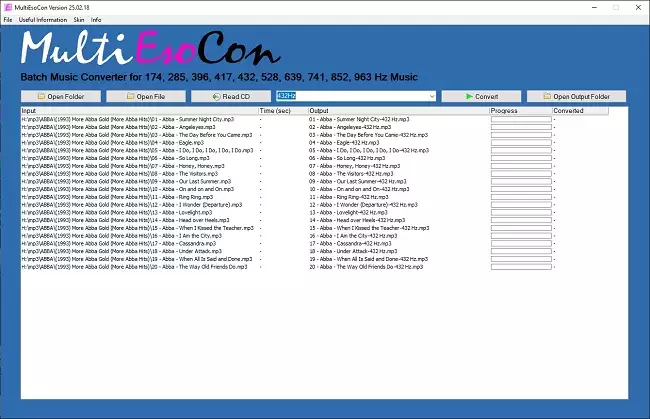
Multiesocon 432 Hz Converter
The main purpose of the program is practical file processing. It lowers the tuning reference of selected audio files while keeping the workflow simple. Users can prepare alternate versions of songs, compare them with the originals, and decide which version fits a playlist, a listening setup, or a specific audio project. The result depends on the source file, the selected output settings, and the playback equipment.
Some users discuss 432 Hz music in connection with background sound, room atmosphere, or listening preferences. A related article about 432 Hz conversion covers this topic from a broader audio perspective. For practical use, the important point is the ability to create an alternate version of a track and then compare it directly with the unchanged file.
Claims about one tuning being objectively better than another should be treated carefully. Listener reactions vary, and the difference between 432 Hz and standard tuning is often judged subjectively. Some people prefer the slightly lower pitch because it sounds less sharp to them, while others prefer the original version or notice only a small difference. MultiEsoCon is therefore best understood as a tool for controlled comparison, not as a tool that guarantees a better result.
Anyone who wants to test 432 Hz music can start with familiar tracks and compare the original file with the converted version. This makes changes in pitch, tone color, and listening impression easier to notice. The process is especially useful when several files need the same treatment, because batch conversion avoids repeated manual work in separate audio editors.
432 Hz Converter and Acoustic Music: What Changes in the Audio File
Instead of changing the composition, a 432 Hz converter adjusts the tuning reference of the selected music file.
For acoustic recordings, small pitch changes can be easier to hear than in dense electronic productions. Instruments with clear overtones, such as guitar, piano, strings, or voice, may sound slightly lower after conversion. Whether this is perceived as warmer, softer, darker, or simply different depends on the listener and on the original recording.
The comparison between 432 Hz and 440 Hz is often discussed in subjective terms. A useful method is direct A/B listening: use the same track, the same playback volume, and the same speakers or headphones. This keeps the focus on the actual audio difference instead of on expectations about a specific tuning.
Technically, the converter changes pitch without intending to change the musical timing. This matters because tempo, rhythm, and arrangement should remain recognizable after processing. A reliable workflow therefore protects the structure of the original file while applying the chosen tuning adjustment.
When working with acoustic material, source quality is important. Compressed or noisy files may reveal artifacts more clearly after processing, while clean recordings usually provide a better basis for comparison. Before exporting the final version, producers can convert the track to 432 Hz and compare both versions. Users who care about detail should begin with the highest-quality version of the track available to them.
The same tuning method can also be tested with other genres. Classical pieces, ambient recordings, electronic tracks, and simple instrumental arrangements each react differently because their sound design and harmonic content differ. This makes the converter useful for controlled listening tests across a music library.
Practical Differences When Converting Music to 432 Hz
The use of 432 Hz tuning for acoustic music is often discussed by listeners who compare different versions of the same recording. Instead of treating one tuning as automatically better, it is more useful to look at concrete listening and workflow differences.
The following points describe practical aspects that can help users evaluate converted files more clearly:
- Some listeners perceive the converted version as slightly lower and less bright than the original 440 Hz version.
- Acoustic instruments may reveal pitch changes more clearly than heavily processed or layered productions.
- Converted files can be useful for building consistent playlists in which all selected tracks use the same tuning reference.
- Direct comparison with the original track helps users decide whether the result suits their taste.
- The quality of the source file influences how clean the converted audio sounds after processing.
- Batch conversion saves time when many songs need the same tuning adjustment.
- Different genres can react differently, so testing several track types is more reliable than judging from one file.
- Playback through better speakers or headphones makes pitch and tone differences easier to notice.
- Keeping an untouched copy of the original file allows later comparison or reprocessing.
- The converted result should be checked by listening, because technical conversion alone does not guarantee a preferred sound.
These points are practical listening criteria, not fixed rules.
Individual preferences can differ, so the original and converted files should be compared before using them in a larger playlist.
Using a 432 Hz Converter for Quiet Audio Projects and Playlists
For quiet audio projects, a 432 Hz converter can prepare tracks with a lower tuning while preserving the character of the original recording.
Quiet music often relies on slow movement, stable tones, and unobtrusive arrangements. A lower tuning may fit this type of listening for users who prefer a less bright sound. The converter does not change the composition itself, but it gives users another version to test in a controlled listening situation.
For background playlists, long listening sessions, or project folders with many tracks, consistency can be useful. If several files come from different sources, converting them with the same tuning target can create a more uniform collection. The practical value lies in easier preparation, clearer file handling, and direct comparison.
Discussions about 432 Hz often include broad claims, but those claims should not be treated as settled fact. The reliable part is the audio process itself: a file is retuned, saved, and then evaluated by listening. This keeps the focus on what the software actually does.
In audio production and sound selection, different tunings may be tested as part of choosing the right version for a project. The 432 Hz converter can support that process by creating alternate versions of existing tracks. Users can then compare those versions in the same playback environment and keep the file that best matches their preference.
Many listeners use 432 Hz versions simply because they like the sound. This preference does not need any wider explanation. It is enough that the converted version fits the listener’s taste, the room, the playlist, or the intended mood of the audio material.
Choosing Music for Conversion: Source Quality, Genre, and Playback
When using a 432 Hz converter for quiet music files, start with clean source material so the converted version remains easy to evaluate.
Before converting a track, the quality of the original recording should be checked. Low-bitrate files, clipping, background noise, or already distorted audio can limit the usefulness of any conversion. A cleaner file gives the software better material to process and makes the comparison with the original more meaningful.
The choice of converter also affects the workflow. Some users need a simple tool for occasional files, while others need batch processing for larger music folders. Through batch processing, a 432Hz converter for MP3 files handles multiple songs within one conversion session. Clear controls, predictable output settings, and support for common audio formats make the process easier, especially when many tracks are involved.
The type of music also matters. Ambient recordings, instrumental pieces, nature-based audio, and sparse arrangements often make pitch differences easier to hear. Dense productions can still be converted, but the tuning change may be less obvious because many sounds overlap.
Personal preference remains the deciding factor. Some users enjoy the lower tuning, while others prefer the original version or another reference. A practical method is to convert a small test group first, listen on the same speakers or headphones, and then decide whether a full batch conversion is worthwhile. A 432 Hz music converter is therefore most useful when it supports careful comparison rather than quick assumptions.
Playback equipment can influence the impression of the converted files. Better headphones or speakers can make small changes in pitch, tone, and detail easier to hear. Poor playback equipment may hide these differences, making it harder to judge whether the conversion achieved the desired result.
Volume should also be kept consistent during comparison. A louder file can seem more impressive even when the tuning is not the reason. Matching playback volume helps users judge the actual sound of the converted track more fairly.
Choosing the Best 639 Hz Converter: Features of Top Batch Conversion Tools
A 639 Hz converter should support batch processing when several files need the same frequency adjustment.
Ease of use is an important factor when selecting a 639 Hz converter. The interface should make importing files, choosing the output format, and starting the conversion clear. A 432Hz converter follows a similar practical idea: users prepare audio files in a defined tuning with as few unnecessary steps as possible.
For large music collections, batch conversion is one of the most useful features. It allows multiple files to be processed together instead of one after another. Users who work with many tracks, such as producers, DJs, or playlist creators, should check how many files can be handled at once and whether the output remains organized.
Format compatibility is another practical criterion. A converter is more flexible when it supports common file types such as MP3, WAV, FLAC, and AAC. This reduces the need for additional tools and makes it easier to keep one consistent workflow from import to export.
Conversion speed also matters, especially with large files or long batches. A useful converter should process audio efficiently while keeping the result stable. Speed alone is not enough, because the converted files still need to sound clean and remain usable in the intended context.
Support and updates should also be considered. Clear documentation can help users understand output settings, file handling, and common workflow questions. Updates may improve compatibility with operating systems or audio formats and can make the software more reliable over time.
Pricing and licensing terms should match the intended use. Free tools may be enough for occasional tests, while paid versions may offer broader format support, batch functions, or fewer limitations. The best value depends on how often the 639 Hz converter is used and how important speed, stability, and file handling are for the user.
| 